Flashcards that live in your notes.
Lemma is a plugin for Obsidian. Tag a note, write a question and its answer in plain Markdown, and Lemma schedules your reviews with FSRS-5.
---
tags: [flashcards]
---
# Groups

---card--- ^group-def
What is the definition of a group?
---
A nonempty set $G$ with a binary operation
$*$ such that it is closed, associative,
has an identity and has inverses.

What is the capital of Japan?::Tokyo ^japan

The ==c1::Ebbinghaus== curve shows that memory
decays without ==c2::spaced repetition==. ^curve
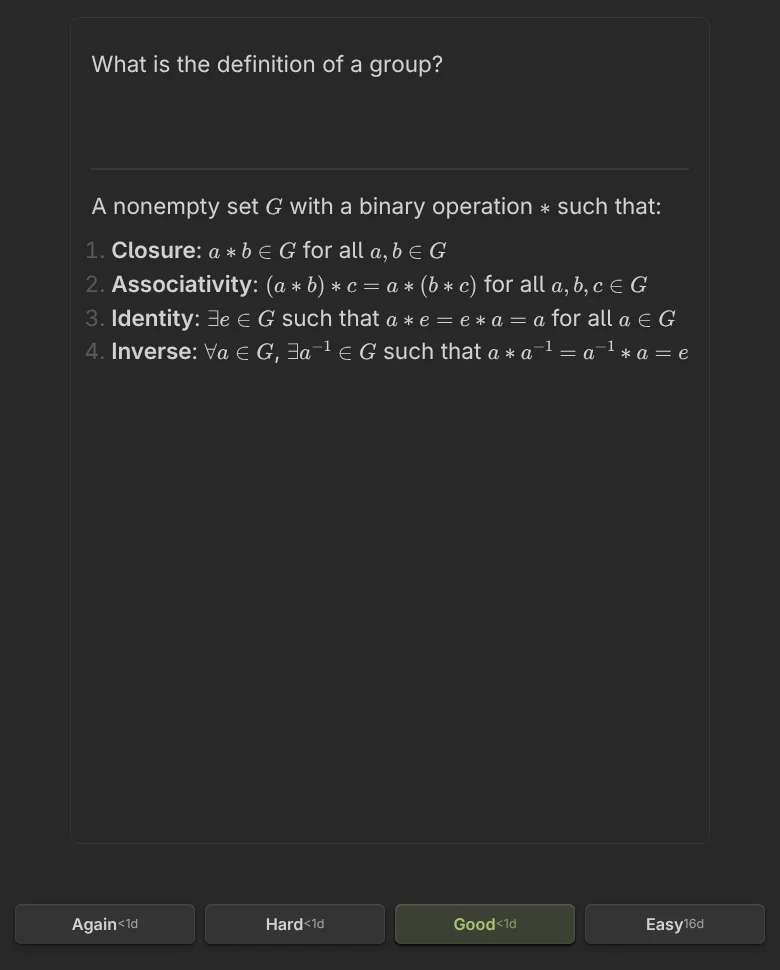
A note is a deck. A question is a card.
Add the tag #flashcards to any note and it becomes a deck. Write cards in the note itself, in plain Markdown, next to everything else you have written. Lemma finds them and keeps its own index.
A question and an answer can use anything Obsidian renders: LaTeX, code, images, callouts. The heading a card sits under shows above the question, so you remember where it came from.
Card formats
- Basic
---card--- / front / --- / backSeveral lines on both sides, with full Markdown. - Single line
Question::AnswerA fast card on one line. - Reversed
Term:::DefinitionOne card that shows the definition and asks for the term. - Cloze
==c1::hidden==Each cloze number in a paragraph becomes its own card, scheduled separately. - Type in
Question::Answer ?typeYou type the answer first. Lemma tells you Correct, Close match or Not correct, then you rate yourself. - Image pair
![[question.png]]::![[answer.png]]If both sides are a single image, the answer image swaps in at the same spot. You supply both images; Lemma does not draw masks. - Whole note
#reviewTag a note #review and review it as one item, with Open in editor, rating and Skip.
You do not have to remember the syntax. Commands insert a template with a fresh ID, and a guided creator shows the raw Markdown as you fill in the fields.
How reviews work
Lemma uses FSRS-5, the Free Spaced Repetition Scheduler. For every card it keeps two numbers: how stable the memory is, and how difficult the card is for you. From those it estimates how likely you are to still remember it on any day.
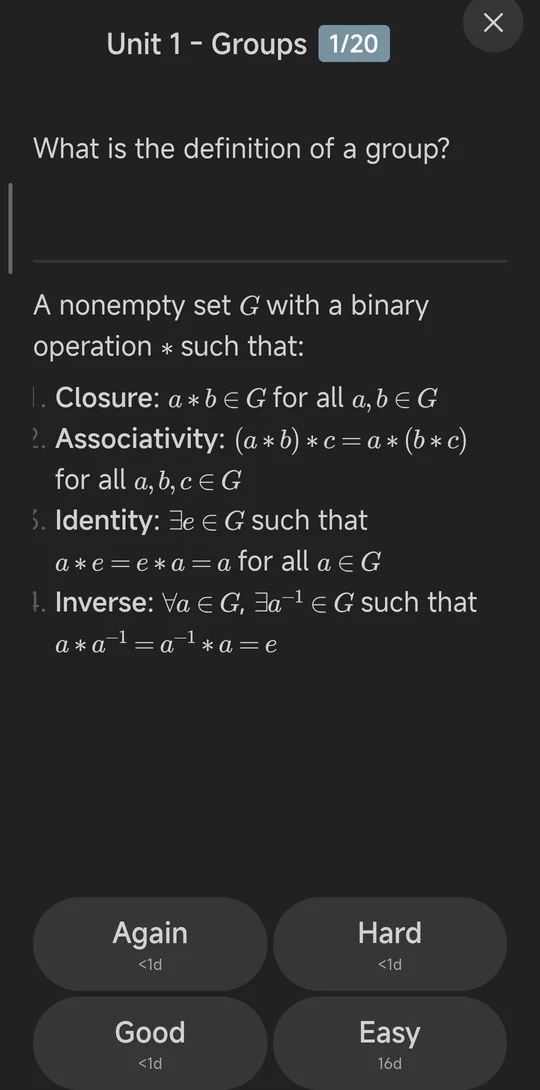
You read the question, reveal the answer, and press Again, Hard, Good or Easy. Lemma updates the two numbers and picks the next due date. Each button shows the interval it will give you, so you can see what your choice does before you make it.
By default Lemma aims for you to remember a card 90 percent of the time when it comes due. You can change that target, the longest interval and the algorithm weights in Settings. Once you have some review history, a built-in optimizer can propose weights fitted to your own history, and you accept or discard the result.
Rate with a key or a swipe
| Rating | Key | Gesture |
|---|---|---|
| Again | 1 | Swipe left |
| Hard | 2 | Swipe down |
| Good | 3 | Swipe right |
| Easy | 4 | Swipe up |
Space or Enter reveals the answer. Swipes work on the phone, and with a mouse drag on the desktop.
Study the way you need to
A dashboard of decks
All your decks in one view with total, due and new counts, grouped by folder. Study what is due, cram a whole deck, or browse its cards.
Daily limits
Set a limit for new cards and for reviews, applied per deck. The defaults are 20 new and 200 reviews.
Custom study
Filter by tag, by card state, or by a card limit for an exam week.
Statistics
Retention against what FSRS predicted, card maturity, review intervals, a 12-month heatmap and a 30-day activity line.
Your data stays yours
There is no Lemma account, no Lemma server and no subscription. Lemma is free and open source under the MIT licence. Here is where everything lives.
- In your Markdown notes
- Questions and answers are text in your vault. Lemma changes a note only when you ask it to, for example to insert a card template, a card ID or the deck tag. Open the notes in any editor, back them up or sync them however you already do.
- On your device
- Card memory states and review logs are kept in a local database inside Obsidian (IndexedDB). They are not in your notes, and they are not sent anywhere.
- Your CouchDB, if you want one
- To share history between devices, point Lemma at a CouchDB or Cloudant server you run or rent. It is off until you turn it on.
What to know
- Review history is not part of your vault files. If you sync your vault with another tool, your cards travel but your review history does not, unless you also use CouchDB sync.
- If you set up CouchDB sync, the server address, username and password are saved in the plugin's settings file inside your vault, as plain text.
- There is no export or import in the plugin today, and no Anki import.
Install
Lemma needs Obsidian 1.4.0 or newer.
Install from Community plugins
In Obsidian, open Settings, then Community plugins. Turn off Restricted mode if it is on, choose Browse, search for Lemma, then Install and Enable.
Tag a note
Add tags: [flashcards] to a note's properties, or write #flashcards in it. That note is now a deck.
Write a card
Type a question, two colons and the answer on one line: What is spaced repetition?::Reviewing at growing intervals.
Open the dashboard
Click the Lemma icon in the ribbon, or run Open dashboard from the command palette. Press Study all due.
Install by hand
- Download main.js, manifest.json and styles.css from the latest release on GitHub.
- Put the three files in a folder named lemma-flashcards inside your vault, at .obsidian/plugins/.
- Restart Obsidian, then turn Lemma on under Settings, Community plugins.
Questions
Is Lemma free?
Yes. Lemma is free, open source and released under the MIT licence. There is no account, no subscription and no paid tier. If you want to support the work, the plugin has an optional donation link.
Does Lemma work on Obsidian mobile?
Yes. The plugin is not desktop-only. It has the same dashboard and review screens on iOS and Android, with a full-screen review and swipe ratings.
Where is my review history stored?
On the device, in a local database inside Obsidian. Your cards are in your notes, but your review history is not, so it does not travel with your vault by itself.
How do I use Lemma on two devices?
Cards travel with your vault, however you sync it. For review history, turn on Lemma's CouchDB sync and point it at a CouchDB or Cloudant database that you control. Without it, each device keeps its own history.
Does Lemma send my notes or cards to a server?
No. The only network connection Lemma makes is the optional sync to the CouchDB address you enter. This website does not use analytics or third-party scripts.
Which scheduling algorithm does it use?
FSRS-5, through the open source ts-fsrs library. You can change the target retention, the longest interval and the weights in Settings.
Can I import my Anki decks?
Not today. Lemma has no Anki import and no export in the plugin. Cards are written in Markdown, so notes can be moved by copying text.
How do I get cards out of my notes later?
They are ordinary Markdown text in your vault, so they stay readable in any editor, with or without the plugin.
Is Lemma in the Obsidian Community plugins list?
Yes. Search for Lemma under Settings, Community plugins, Browse. You can also install by hand from the files on the GitHub release page.
Where do I report a bug or ask for a feature?
On the GitHub issue tracker for Lemma. The documentation is at fundaments.work/docs/lemma.